
How to Register for CRA My Business Account (and Authorize Your Accountant)
Register the account yourself, because the CRA will not let anyone else do it, then let your accountant handle everything that follows. This guide covers what you need, how identity is verified now, the two ways an accountant is authorized, and what each access level allows.
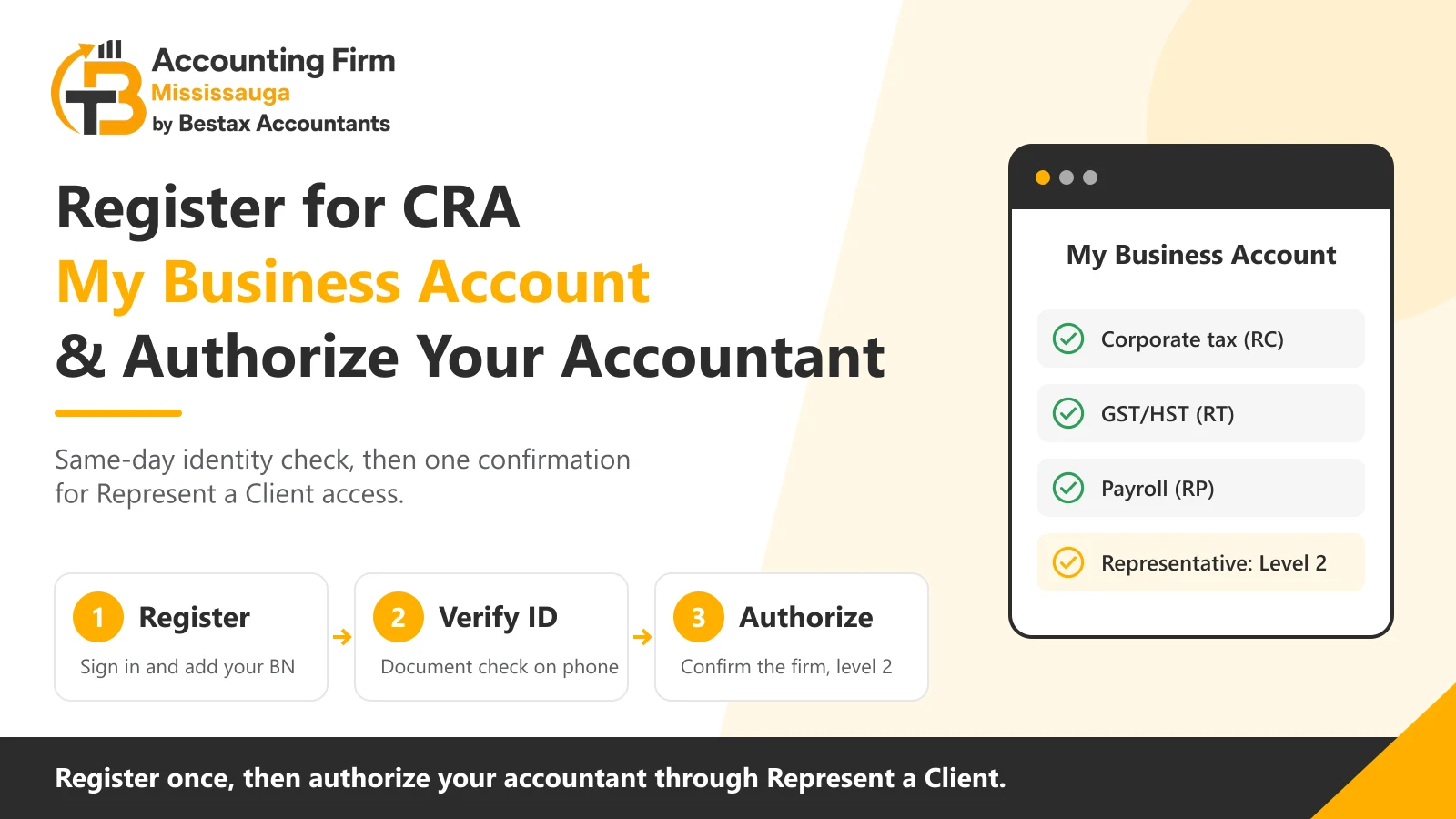
The CRA will only register a My Business Account for a person it already has on file as an owner, partner, director or officer of the business. Your accountant cannot do it for you, and is never given your login to do it as you. What your accountant can do is everything after that, through their own Represent a Client access, once you have authorized them.
In this guide, we cover what you need before you start and how the registration and identity check work in 2026. We then cover the two routes to authorizing your accountant, the level to choose, and the mistakes that lock owners out.
What CRA My Business Account Is and What You Need to Register
CRA My Business Account is the online portal for every program account your business holds with the CRA, including corporate tax, GST/HST, payroll and import-export. Since 2025 it sits inside a single CRA account alongside My Account for your personal taxes, so one sign-in reaches both.
What the Account Lets You Do
- File GST/HST and payroll returns and view the corporate tax return once filed
- See balances, payments, instalments and the dates each is due
- Read CRA mail, which has arrived online by default for most businesses since mid-2025 and is deemed received the day it is posted
- Authorize, change or remove a representative
- Respond to a CRA review or request for information
What You Need Before You Start
The registration takes ten minutes with the right items at hand and stalls for weeks without them.
- Your nine-digit business number, from the CRA letter that issued it or any CRA notice
- Your social insurance number, date of birth and postal code as the CRA has them on file
- An amount from a line the CRA specifies on one of your last two personal tax returns, so have both returns to hand
- A mobile device with a camera and a valid Canadian passport, driver's licence or provincial ID, for the instant identity check
- Your position with the business recorded with the CRA, as owner, partner, director or officer
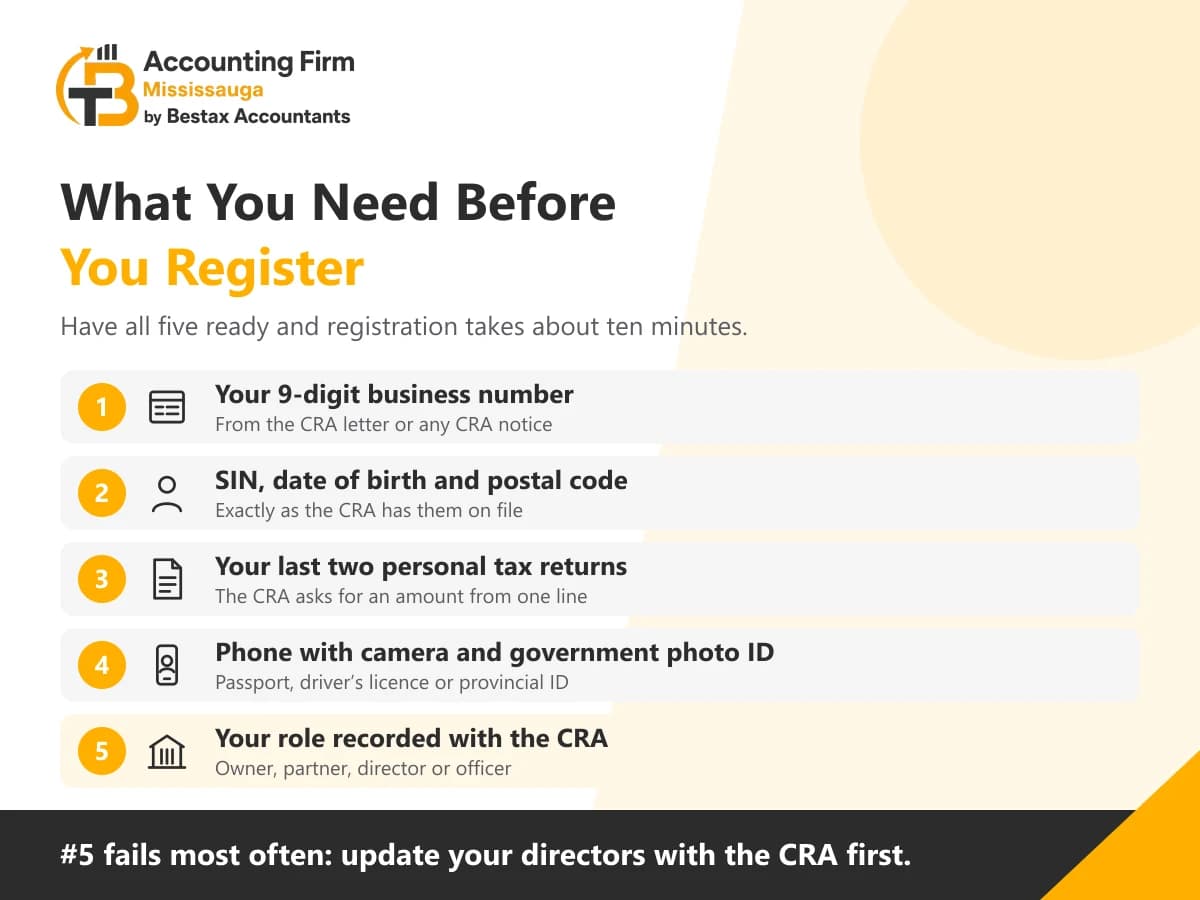
The last item is the one that fails most often. A director added at the corporation's last annual filing but never reported to the CRA is not on its file. The registration is refused until the corporation updates its directors with the CRA.
Who Can Register
Only a person the CRA records as having authority for the business. For a sole proprietorship that is you. For a corporation it is a director or officer the CRA has on file. For a partnership it is a partner. An employee, a bookkeeper or a family member who runs the business day to day cannot register. An owner who lets them use their own credentials has breached the CRA's terms and exposed the account.
How to Register for CRA My Business Account in 2026
Registration is the one step in this guide the CRA requires you to complete yourself. Our team walks you through it on a call, and the sequence below is what you will see.
Choose a Sign-In Method
- CRA user ID and password, created during registration
- Sign-In Partner, using the login you already have with a participating bank
- Provincial partner, using an Alberta.ca Account or a BC Services Card, which gives immediate access
The method you choose is the one you use every time afterwards, so most owners pick the bank login they use daily. Multi-factor authentication is mandatory, by text, voice call or passcode grid.
Verify Your Identity
The CRA offers two routes, and the difference is the same day against two weeks.
Document verification service
How it worksPhotograph your government ID and your face on your phone, and the CRA matches them to its recordsTime to full accessImmediateCRA security code
How it worksThe CRA mails a code to the address on your file, which you enter on your next sign-inTime to full accessUp to 10 business days, and the code expires
| Route | How it works | Time to full access |
|---|---|---|
| Document verification service | Photograph your government ID and your face on your phone, and the CRA matches them to its records | Immediate |
| CRA security code | The CRA mails a code to the address on your file, which you enter on your next sign-in | Up to 10 business days, and the code expires |
Choose the document verification service. The security code route fails where the CRA's address for you is out of date, and the only fix is to update the address and wait again. If the code does not arrive within 10 business days, the CRA lets you switch to document verification at sign-in.
Add the Business Number
Once your identity is verified, you add a Business account to your CRA account by entering the nine-digit business number. The CRA checks your social insurance number against the owners, partners, directors and officers it has on file for that number. If you are among them, the business opens. Every program account under the number, corporate tax, GST/HST and payroll, appears at once. A second business is added the same way.
Authorize Your Accountant Through Represent a Client
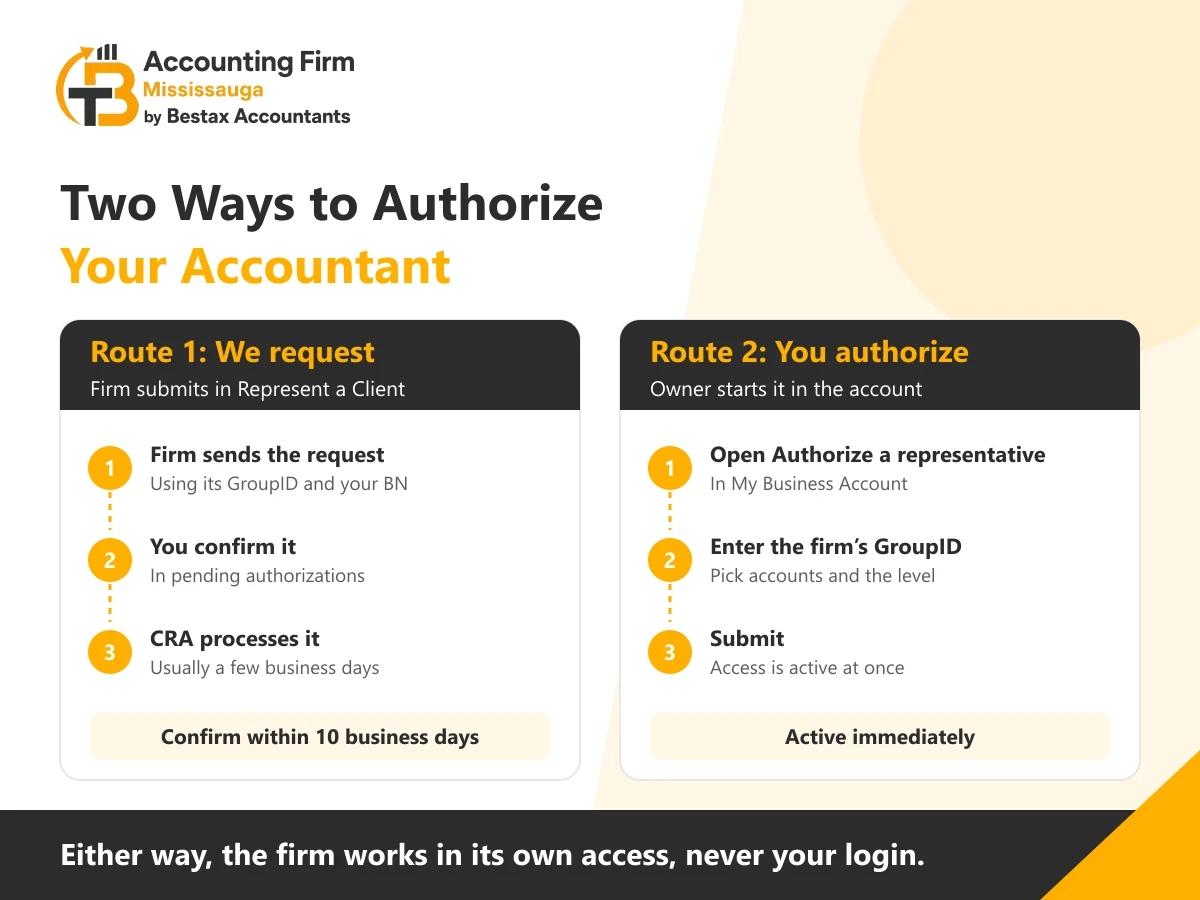
Once your account is open, the authorization is what our team does for you, and you confirm it. Two routes exist, and both end with the firm working in its own Represent a Client access rather than yours.
Route One: We Request, You Confirm
Our team submits an authorization request through Represent a Client using the firm's GroupID, the business number and the access level agreed with you. The request appears in your My Business Account under pending authorizations, and you confirm it there within 10 business days. The CRA then processes it, usually within a few business days, and the business appears on the firm's client list.
- We submit the request through Represent a Client with the firm's GroupID
- You sign in, open the pending authorization, and confirm it within 10 business days
- The CRA processes the authorization and our team gains access at the level confirmed
Route Two: You Authorize Us Directly
Where you prefer to initiate it, you open Authorize a representative in My Business Account, enter the firm's GroupID, choose the program accounts and the level, and submit. The authorization is active at once. We give you the GroupID in writing. A RepID belongs to one person and a GroupID covers the firm, so a change of staff on your file does not break the access.
Which Authorization Level to Choose
Level 1, view
What the representative can doSee balances, returns, mail and transactionsWhen our team asks for itReview and advisory engagementsLevel 2, update and view
What the representative can doEverything in level 1, plus file returns, make adjustments and respond to the CRAWhen our team asks for itBookkeeping, HST, payroll and corporate tax filing, which is most clientsLevel 3, delegated authority
What the representative can doEverything in level 2, plus authorize other representatives and change the mail delivery methodWhen our team asks for itRarely, and only where you have asked us to manage other advisers' access or the mail settings
| Level | What the representative can do | When our team asks for it |
|---|---|---|
| Level 1, view | See balances, returns, mail and transactions | Review and advisory engagements |
| Level 2, update and view | Everything in level 1, plus file returns, make adjustments and respond to the CRA | Bookkeeping, HST, payroll and corporate tax filing, which is most clients |
| Level 3, delegated authority | Everything in level 2, plus authorize other representatives and change the mail delivery method | Rarely, and only where you have asked us to manage other advisers' access or the mail settings |
An expiry date is optional. Most owners leave it open and remove the authorization when the engagement ends, which takes one click.
Form AUT-01, and When It Is the Wrong Tool
Form AUT-01 authorizes a representative to deal with the CRA by phone, mail and fax. The form gives no online access, so a firm authorized only by AUT-01 cannot file your returns electronically or read your CRA mail. A business whose only representative holds AUT-01 access also stays on paper mail, because the CRA's online-mail default applies where someone has online access. The form exists for owners who cannot use the online services at all, and the online authorization replaces it for everyone else.
Keep the Account Working After You Register
The account is set up once and then has to stay reachable, because the CRA's mail, its reviews and its deadlines all arrive through it. Since May 12, 2025 for new registrations and June 16, 2025 for existing businesses, most correspondence is online by default and counts as received on the day it is posted. An email alert goes to up to three addresses per program account. A business can return to paper mail by request in the account or on Form RC681, and only an owner, director or level 3 representative can make that change.
What Our Team Does Once Authorized
With level 2 access in place, our team files the GST/HST and payroll returns from the account and reads the CRA's mail as it arrives. We answer reviews and information requests and track the balances and instalment dates. You see the same information in your own account at any time, and the CRA's mail reaches both of us. Our Mississauga accounting team sets a short call with every new client to complete the registration together and confirm the authorization the same day.
- Returns filed and payments scheduled from the account
- CRA mail read and actioned as it arrives
- Reviews and information requests answered within the CRA's deadline
- Balances, instalments and due dates monitored
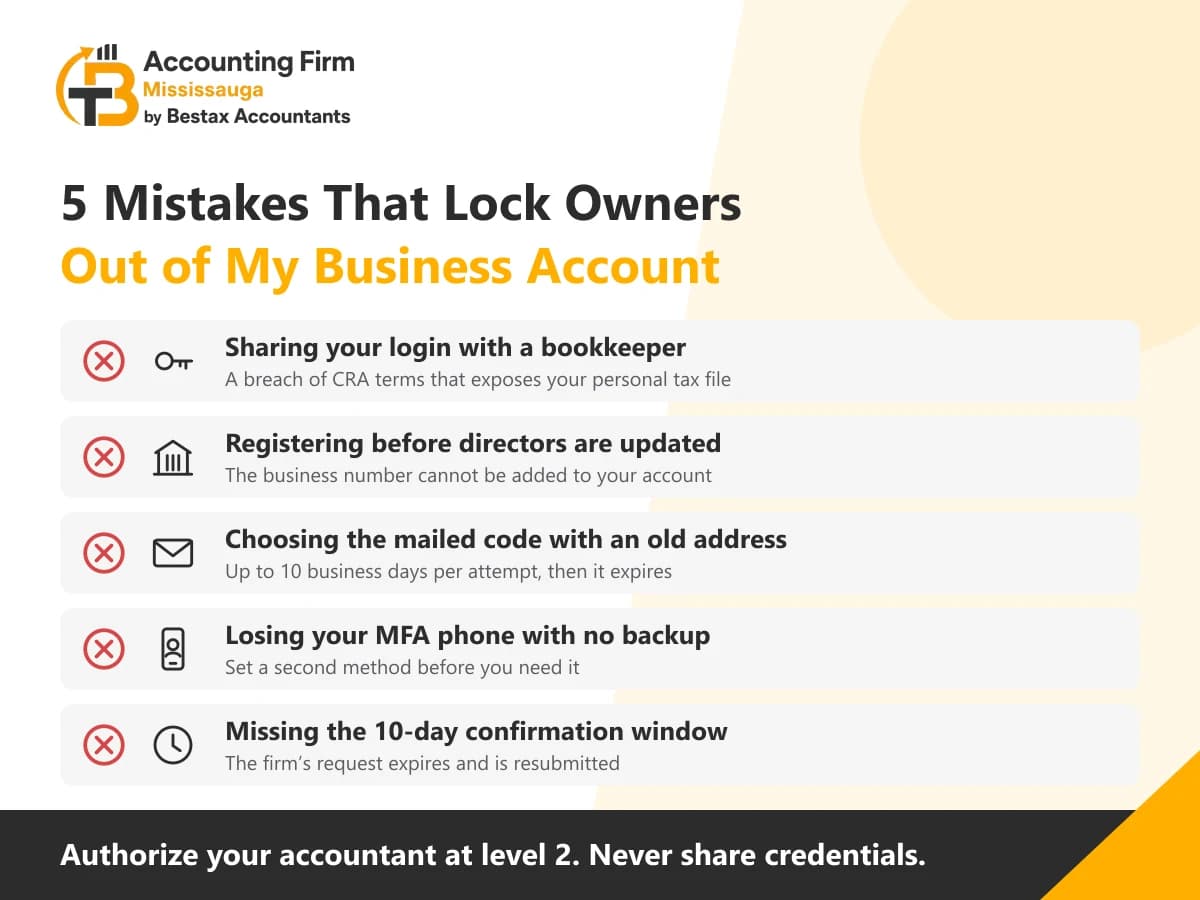
The Mistakes That Lock Owners Out of My Business Account
- Letting the accountant or bookkeeper use your login, which the CRA treats as a breach and which puts your personal tax file in someone else's hands
- Registering before the corporation's directors are updated with the CRA, so the business number cannot be added
- Choosing the mailed security code with an old address on file, then waiting through two cycles
- Losing the device or phone number used for multi-factor authentication without having set a backup method
- Leaving the pending authorization unconfirmed past 10 business days, so our request expires and has to be resubmitted
Register Today and Confirm Our Request the Same Afternoon
The account takes ten minutes to register with the document verification service, and the authorization takes one confirmation from you.
- Confirm your position with the business is on the CRA's file before you start
- Register through a Sign-In Partner and verify by document verification for same-day access
- Add the business number, then confirm the firm's pending request within 10 business days
- Choose level 2 for a filing engagement, and never share your own credentials
Send us your business number and the name the CRA has for you. Our team will book the registration call, submit the authorization request the same day, and tell you exactly where to confirm it.
Frequently Asked Questions
I registered for My Account years ago. Do I need a separate account for the business?
No. Since 2025 the CRA runs one account for the person. You sign in to the CRA account you have and add a Business account to it with your business number. The CRA has to have you on file as an owner, partner, director or officer of that business.
My bookkeeper has been using my login. How do I fix that?
Change your password and multi-factor method today, then authorize the bookkeeper properly as a representative at the level their work needs. Shared credentials breach the CRA's terms and expose your personal tax file, and a CRA review of unusual access on the account lands on you.
Can I authorize my accountant for GST/HST but not for corporate tax?
Yes. The authorization is granted by program account. You can give access to the GST/HST and payroll accounts and withhold the corporate tax account, or set different levels for each. Most owners authorize all accounts at level 2, because the firm filing the HST return needs the same picture the corporate return draws on.
How long does the CRA take to process an authorization?
A request confirmed online is usually processed within a few business days. An authorization you grant directly in My Business Account is active immediately. A paper AUT-01 takes weeks and gives phone and mail access only.
What happens to the authorization if I change accountants?
You remove the old firm in My Business Account with one click, and the access ends at once. You then authorize the new firm, or confirm its request, and the new firm's access starts from that point with no gap in the CRA's mail reaching someone.
Disclaimer: The information provided in this blog is for general informational purposes only. For professional assistance and advice, please contact experts.
On this page
Never miss a deadline again
We track every filing date for our clients. Let us watch yours.
Book a free callPayroll & HST/GST Team
Our expert-supervised payroll and sales tax team runs full-cycle payroll and remittances and handles GST/HST registration and filing for Mississauga businesses.
Reviewed by: Corporate & Small Business Tax Team
Recent posts
View all → Personal Tax
Real Estate Accountant Mississauga: Tax, Bookkeeping and Property Accounting
Settle three things before the next rental year closes: how the property is owned, whether CCA is worth claiming, and what the sale will cost in tax. This guide covers rental income accounting, HST on property, the 2026 capital gains rules and the bookkeeping behind all three.
 Bookkeeping
Best Accounting Software for Small Businesses in Mississauga: QuickBooks vs Xero vs Wave
Match the software to how you file HST and run payroll, not to the price list. This guide compares QuickBooks Online, Xero and Wave on what a Mississauga business pays, what each does with GST/HST and payroll, and which fits a sole proprietor, a service firm and a company with staff.
 Bookkeeping
Catch-Up Bookkeeping: What to Do When You're Months (or Years) Behind
Behind on your books and your filings? Here's the order to catch up in, where missing records actually come from, what the delay really costs in CRA penalties, and how the Voluntary Disclosures Program changed in October 2025.
Free Consultation
Tell Us What You Need. Get a Real Answer Back.
No sales script, no obligation. Describe your situation once and an accounting specialist will follow up with a straight answer and a flat quote.
- Flat-fee quote before any work starts
- Response within one business day
- Reviewed by an expert accountant, not just a bookkeeper